Overview
Error Code 502 indicates that an internal server error occurred within the Softdrive platform.
This typically means the Softdrive web server was unable to receive a valid response from one of its internal services or underlying third-party infrastructure providers.
These errors are considered platform-side issues, are treated as high priority, and are usually resolved within a short period.
Applies To
- Softdrive Platform
- Softdrive Dashboard
- Authentication / Login Services
Symptoms
- Unable to log in to the Softdrive dashboard
- Internal server error message displayed
- Pages fail to load or return errors
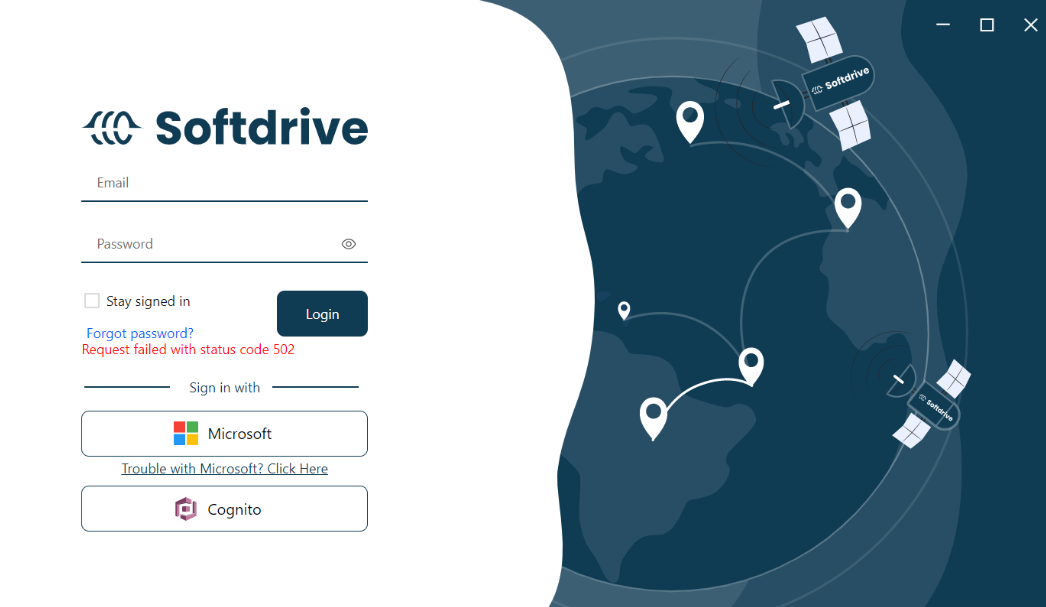
Possible Causes
- Temporary outage or degradation of Softdrive backend services
- Failure in internal web services or APIs
- Connectivity issues between Softdrive services and third-party providers
- Ongoing maintenance or unexpected platform instability
This error is not caused by client-side configuration, firewall rules, VPNs, or endpoint security software.
Resolution
- Retry after a few minutes
- Most 502 errors are temporary and resolve automatically
- Check service availability
- Verify if there is an ongoing outage or maintenance window
- Avoid repeated login attempts
- Repeated attempts will not resolve the issue while services are unavailable
Validation / Expected Result
- The user is able to log in successfully
- Dashboard loads without errors
- No internal server error message appears
Troubleshooting Notes
- This is a platform-side issue outside user control
- If multiple users are affected, it likely indicates a broader outage
- Retrying after a short delay is typically sufficient
Escalation
If the issue persists, contact Softdrive Support and include the following:
- Error code: Error Code 502 – Internal Server Error
- Date and time of occurrence
- Network type (home, corporate, VPN, hotspot)
- Screenshot of the error message
- Description of any network issues observed
Email: support@softdrive.co