Overview
Starting with Softstream version 4.8.0, organization administrators can use Version Locking to control when a new Softstream version is deployed across their organization.
Version Locking pins the organization to a selected version and keeps the Softstream launcher, client, and server components aligned with the organization-approved version.
Version Locking supports Softstream version 4.8.0 and later. An organization cannot select a version earlier than 4.8.0.
Applies To
- Softstream version 4.8.0 and later
- Softdrive organization administrators
- Organizations using Softstream Version Locking
Prerequisites
- Organization administrator access to the Softdrive dashboard
- Softstream version 4.8.0 or later
- A planned maintenance window for the deployment
- All affected users notified of the temporary service interruption
- No users actively working in their Softdrive sessions during the deployment
Changing the organization’s Softstream version causes a temporary service interruption. Do not begin the deployment while users are actively working in their Softdrive sessions.
Procedures
Configure Version Locking
- Sign in to the Softdrive dashboard as an organization administrator.
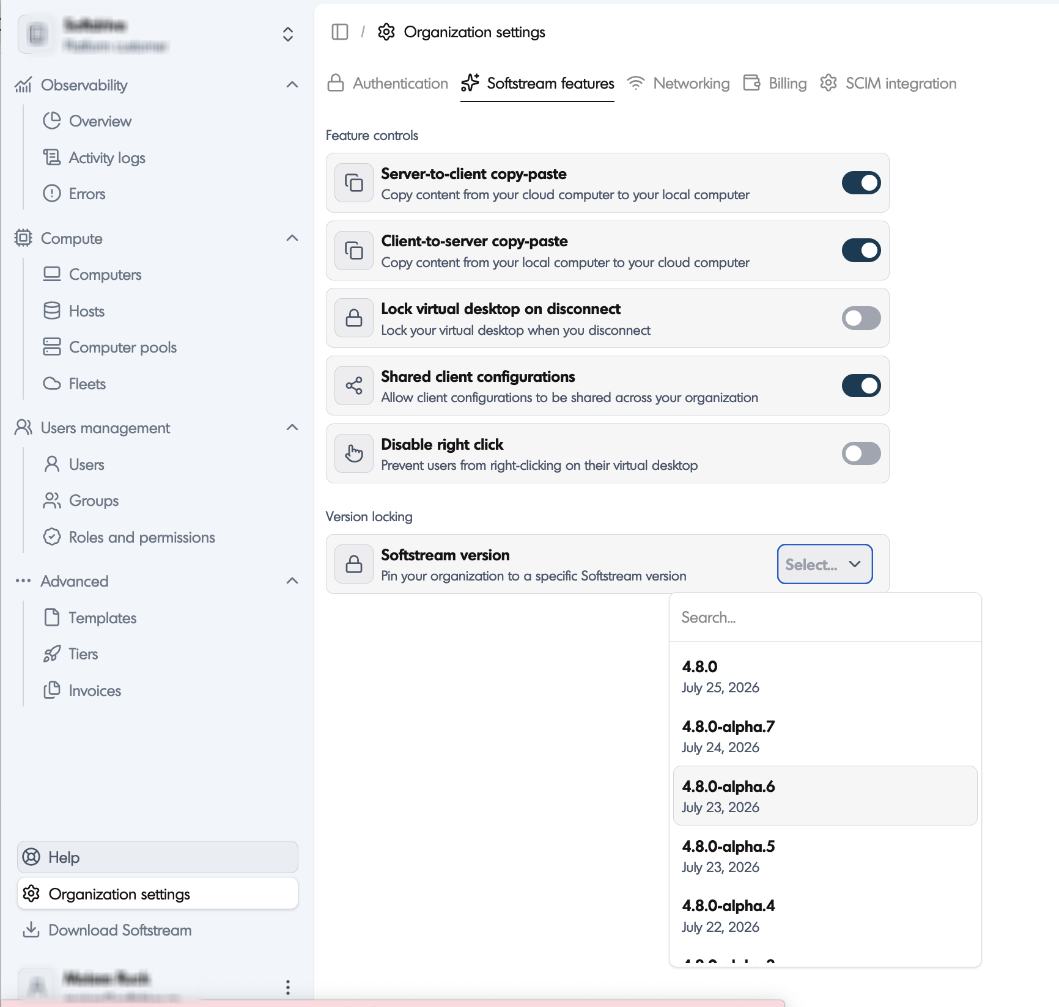
- Open Organization Settings.
- Select Softstream Features.
- Scroll down to the Version Locking section.
- Under Softstream Version, open the version menu.
- Select the Softstream version you want to deploy.
- Review the confirmation message carefully.
- Enter the requested confirmation text.
- Select Lock to begin the deployment.
What Happens During the Update
After the version is selected and the deployment begins:
- The organization is pinned to the selected Softstream version.
- The server and launcher/client components are updated together.
- Users experience a temporary service interruption.
- The launcher displays a notification indicating that the upgrade is in progress.
- The launcher automatically downloads and installs the required version.
- The existing launcher closes during installation.
- After the installation finishes, the launcher automatically relaunches.
The update does not require the user to manually approve the launcher installation.
Launcher Version Enforcement
Whenever the Softdrive launcher opens, it compares its installed version with the version selected for the organization.
If the versions are different, the launcher automatically downloads or installs the version assigned to the organization. The user receives a notification while the version change is in progress.
This process keeps the launcher, client, and server components on the same organization-approved Softstream version.
Current Version Limitations
- Versions earlier than Softstream 4.8.0 cannot be selected.
- Downgrading to an earlier version is not currently supported.
- Downgrade functionality is planned for a future release.
- Administrators should carefully confirm the selected version before starting the deployment.
Expected Results
- The organization is locked to the selected Softstream version.
- The launcher/client and server components use the same version.
- The launcher automatically installs the organization-approved version when a version difference is detected.
- The launcher automatically relaunches after the update is completed.
- Users can reconnect after the deployment and service interruption have ended.
The Softstream launcher, client, and server components remain aligned with the version selected under the organization’s Version Locking settings.
Troubleshooting
The Requested Version Is Not Available
Confirm that the requested version is Softstream 4.8.0 or later. Version Locking cannot select or deploy versions earlier than 4.8.0.
The Launcher Shows an Upgrade in Progress
Allow the update to finish. The launcher may close while the required version is installed and should relaunch automatically when the installation is complete.
The Launcher Does Not Relaunch
Wait several minutes for the deployment to finish, and then manually reopen the Softdrive launcher. When opened, the launcher checks the organization’s assigned version and installs it automatically if required.
Users Cannot Connect During the Deployment
A temporary service interruption is expected while the launcher/client and server components are being updated. Users should wait until the deployment is complete before reconnecting.
The Organization Needs to Return to an Earlier Version
Downgrading is not currently supported. Contact Softdrive Support if assistance is required after deploying a newer version.
The Update Does Not Complete
If the update remains in progress or users cannot reconnect after allowing sufficient time for the deployment, contact Softdrive Support and provide:
- The organization name
- The version selected for deployment
- The approximate time the deployment started
- A screenshot of the message displayed in the launcher or dashboard
- The names of any affected computers or users