Overview
This article provides a categorized index of Softdrive error codes to help quickly identify and resolve connection issues.
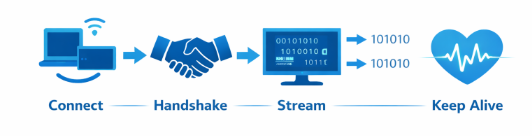
Errors are grouped by session phase (Connect, Handshake, Stream, Keep Alive) so you can determine where the failure occurs and take the appropriate action.
Use this page to:
Identify the error code
Understand the cause
Navigate to detailed troubleshooting steps
How to Use This Guide
Identify the error code shown in the Softdrive client
Locate the code in the sections below
Review the quick fix
Follow the linked article for full troubleshooting (if available)
Session Lifecycle (Quick Reference)
Softdrive sessions follow a defined lifecycle to establish and maintain a secure, high-performance remote connection.
The process begins with Connect, where the client reaches the Softdrive backend and validates basic network access. It then moves into Handshake, during which secure TLS negotiation and session parameters are established. Once completed, the session enters Stream, where video, input, and system data flow continuously between the client and the virtual machine. Finally, Keep Alive ensures session stability by sending periodic heartbeats to detect connectivity issues and prevent stale or orphaned sessions.
The errors listed below are grouped according to the stage in which they occur. This helps quickly identify whether a failure is related to initial connectivity, security negotiation, active streaming, or session maintenance, allowing for faster troubleshooting and more accurate root-cause analysis.
Internal & HTTP Errors
| Error Code | Description | Session Phase | Typical Cause | Quick Fix |
|---|---|---|---|---|
| Error Code 1001–1004 | Internal error | Pre-Session | Unexpected client/service failure | Retry connection; restart client if persistent |
| Error Code 500 | Internal Server Error | Connect | Backend service returned an error | Retry later or contact support |
| Error Code 502 | Bad gateway | Connect | Upstream service unavailable or timed out | Retry after a few minutes |
| Error Guest Agent not Responding | Guest agent is not responding | Stream | VM agent stopped, hung, or not reporting | Restart VM; if recurring, update agent/tools |
TLS & Handshake Errors (01–06)
| Error Code | Description | Session Phase | Typical Cause | Quick Fix |
|---|---|---|---|---|
| Error Code 01 | TLSHandshakeFailed | Handshake | Firewall/TLS inspection/proxy blocking or altering TLS | Whitelist Softdrive domains; bypass SSL inspection |
| Error Code 02 | TLSHandshakeTimeout | Handshake | High latency, packet loss, or blocked outbound path | Test network stability; try alternate network |
| Error Code 03 | HandshakeTimeout | Handshake | Handshake negotiation did not complete in time | Retry connection; confirm firewall allows traffic |
| Error Code 04 | KeepAliveTimeout | Keep Alive | UDP blocked/filtered or heavy jitter causing missed heartbeats | Allow UDP; reduce filtering/EDR inspection |
| Error Code 06 | ClientException | Handshake | Local client error or dependency issue | Restart client; reinstall if it continues |
| Linux Error 127 | Abrupt Disconnect Error 127 | Handshake | Missing Linux libraries or dependencies required by SoftdriveClient | Run dependency check and install missing packages |
Session & Server Errors (07–11)
| Error Code | Description | Session Phase | Typical Cause | Quick Fix |
|---|---|---|---|---|
| Error Code 07 | ServerException | Stream | Server-side streaming/session process error | Retry; contact support if persistent |
| Error Code 08 | MonitorTopologyFail | Stream | Unsupported monitor layout/resolution or display change mid-connect | Reduce monitors; reset resolution; reconnect |
| Error Code 09 | SessionSettingsTimeout | Stream | Session initialization stalled (policy/agent/network delay) | Restart session; verify VM is responsive |
| Error Code 10 | OtherClientConnected | Stream | Another active session already holds the VM | Disconnect the other session; wait and retry |
| Error Code 11 | TCPConnectionFailed | Connect | Outbound TCP blocked by firewall/proxy | Allow required ports/domains; bypass proxy if needed |
Connection, Restart & Authentication Errors (12–19)
| Error Code | Description | Session Phase | Typical Cause | Quick Fix |
|---|---|---|---|---|
| Error Code 12 | TCPDisconnection | Keep Alive | Temporary network drop or unstable connection | Reconnect; stabilize Wi-Fi/VPN |
| Error Code 13 | ServerRestart | Stream | VM restarted unexpectedly or maintenance event | Wait 1–3 minutes, then reconnect |
| Error Code 14 | UserProcessTermination | Stream | User session closed, app crash, or forced logoff | Start a new session; review app stability |
| Error Code 15 | UserAuthenticationFailure | Connect | Invalid credentials, token expired, or SSO issue | Sign in again; confirm account/SSO status |
| Error Code 18 | Server is unreachable | Connect | VM offline, DNS/network blocked, or routing issue | Verify VM is powered on; check firewall/DNS |
| Error Code 19 | ConnectionFailed | Connect | General connectivity failure (often firewall/EDR/network) | Allow UDP/TCP; disable filtering; retry |