Overview
The Softdrive API provides a comprehensive set of RESTful endpoints that allow administrators and developers to manage, monitor, and automate their Softdrive environment programmatically.
Available endpoints cover areas such as authentication, billing, automations, computer management, client configurations, and computer actions. The API supports integration with Microsoft, Okta, and Cognito authentication systems.
This guide explains how to access the API documentation, test requests directly from the Softnet dashboard, and safely use the available administrative endpoints.
Applies To
- Softnet Dashboard
- Softdrive API
- Administrators and Developers
- Automation and integration workflows
Prerequisites
- Administrator access to Softnet
- API access enabled
- API key or authentication credentials
- Basic understanding of REST APIs
Procedure
1. Access the API Documentation
- Log in to:
https://softnet.softdrive.co/ - Navigate to:
Help → API Documentation

The API documentation page contains a categorized list of all available endpoints along with supported methods, parameters, and response formats.

2. Ways to Use the API
There are two primary ways to interact with the Softdrive API:
- Through the Softnet Dashboard
The dashboard includes a built-in API testing interface. - Through Your Own Applications
You can integrate directly into your own systems and workflows.
To request API access or obtain an API key, contact:
support@softdrive.co
3. Example – Retrieve a List of Computers (GET)
This example demonstrates how to use the GetComputers endpoint.
- Locate:
COMPUTERS → GetComputers - Review the available query parameters, request structure, and response format.

- Click:
Test Request
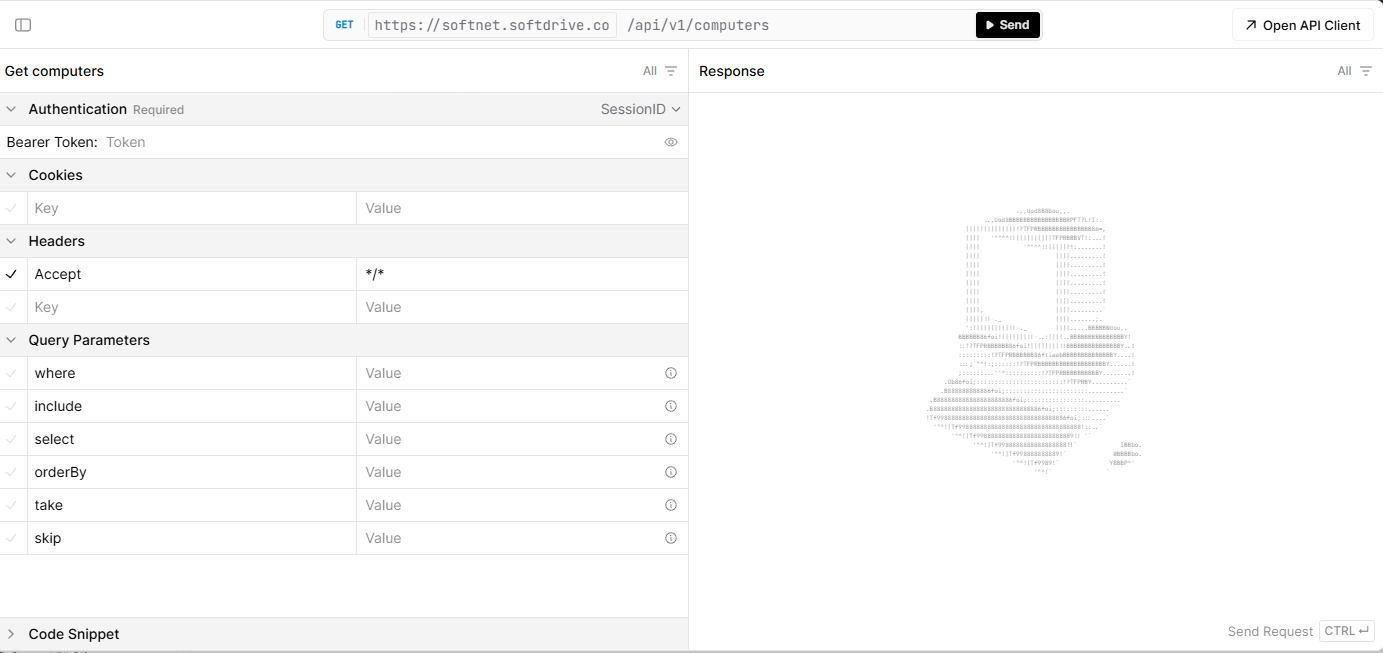
- Click SEND to retrieve all computers within your tenant.

- Optional query parameters can filter results or include additional information.

4. Example – Restart a Machine (POST)
This example demonstrates how to reboot a machine using its computer ID.
- Locate the:
endpoint and select:RebootTest Request

- Provide the machine ID and click SEND.
- A successful response returns:
200 OK - The machine will reboot immediately.

Warning
This API provides direct administrative access to critical platform components including computers, clusters, authentication settings, and configuration data.
Some endpoints allow actions that can permanently modify or delete resources such as:
- Computer pools
- Host records
- User sessions
- Configuration data
Exercise caution when using:
DELETE
PUT
POST
These operations can have immediate and irreversible effects on your environment.
We strongly recommend:
- Restricting API access to trusted administrators
- Using least-privilege service accounts
- Keeping API credentials secure and private
- Reviewing requests carefully before execution
Improper usage may result in service interruption, security issues, or data loss.
Expected Result
Administrators and developers can successfully access and test Softdrive API endpoints to manage and automate their environment securely.
Troubleshooting
- Verify API credentials are valid
- Ensure the correct HTTP method is being used
- Check required request parameters
- Confirm endpoint permissions are assigned correctly
- If issues persist, contact support@softdrive.co